Study
Study How to Use a Study Planner App: A Setup Guide for Students
Set up a study planner app in 20 minutes: timetable, exams, homework and a study plan. For high school, college and university students anywhere.
Key takeaways
- A study planner app keeps your class timetable, homework, exam dates and study sessions in one place and reminds you what to do next. It works the same whether you are in high school, college or university, in any country.
- Set-up takes about 20 minutes: timetable → exams → homework → study plan → study blocks → weekly review.
- Planning pays off: in a study of college students, time-management habits predicted grades better than SAT scores (Britton & Tesser, 1991).
- Use the planner to spread revision over days and test yourself. These are the two techniques rated most effective in a major review of learning research.
- ClassTrack is a free study planner app for students on Android, with AI timetable import from a photo or PDF, exam countdowns and AI study plans. Disclosure: we make it.
Short answer: to use a study planner app well, put in your class timetable, exam dates and homework first, then let the app turn them into study blocks spread across the days before each deadline, and review the plan once a week. It takes about 20 minutes to set up and a few minutes a day to keep up.
This guide is for any student: high school, college, university or self-taught, on semesters, terms or quarters, anywhere in the world. It explains what a study planner app does, why planning is linked to better grades, a 6-step set-up you can copy, and how our app, ClassTrack, handles each step.
What is a study planner app?
A study planner app is a phone or web app that keeps a student’s class timetable, homework, exams and study sessions in one place, and sends reminders so nothing is missed. It differs from a normal to-do list in three ways:
- It understands repeating classes. You add Monday’s 9:00 lecture once, not every week.
- It links work to subjects. Homework, grades and exams sit under the class they belong to.
- It plans backwards from deadlines. An exam is not one task on one day; it is a set of study sessions over many days.
Newer study planners, sometimes called AI study planners, add help on top: reading your timetable from a photo, building a topic-by-topic plan, or answering questions like “what should I revise tonight?”.
Why students who plan get better results
Planning is not just about feeling organised. Research links it to grades and to finishing work on time.
| Finding | What it means for your planner |
|---|---|
| Among 90 college students, short-range planning and time attitudes predicted cumulative GPA, and did so better than SAT scores (Britton & Tesser, 1991). | Planning your week is a skill you can learn, and it matters as much as raw ability. |
| An estimated 80–95% of college students procrastinate, and procrastination is linked to lower performance (Steel, 2007). | Small, dated tasks are easier to start than one big “study for finals”. |
| Across 94 studies, deciding when and where you will act had a medium-to-large effect on reaching goals (Gollwitzer & Sheeran, 2006). | “Biology, Tuesday 4:30, library” works better than “study biology this week”. |
| Of ten popular study techniques, only practice testing and spaced practice were rated high utility (Dunlosky et al., 2013). | Use the planner to spread revision over days and to schedule self-tests. |
Put simply: a planner helps you do the things that work (start early, space your study, test yourself) without needing to remember to do them. More detail is in what the research says about study techniques.
Who a study planner is for
A study planner is useful for any student who has more than one deadline at a time. The set-up is the same everywhere; only the names of your exams change.
| Student | What they plan | Most useful features |
|---|---|---|
| High school / secondary school | Daily homework, unit tests, end-of-year or national exams (for example AP, GCSE, A-level, IB or board exams) | Homework list, exam countdowns, after-school routine |
| College and university | Lectures, labs, assignments, midterms and finals across a semester, term or quarter | Class timetable, assignment due dates, grades and GPA |
| Exam preparation | One big test months away (for example SAT, finals, a professional or entrance exam) | Topic-by-topic study plan, revision rounds, daily blocks |
| Self-learners and working students | Online courses, certifications, a new skill around a job | AI learning plan, habits, reminders |
How to set up a study planner app in 6 steps
Do these steps in order. Each one gives the next step the information it needs.
Step 1: Import your class timetable
Add every class once, with day, time, room and teacher. In ClassTrack you can take a photo of your timetable, upload the PDF or paste the text and let AI build the week.
Step 2: Add every exam date
Enter each test, final or entrance exam with its date so the app can count down and you can see which exam is closest.
Step 3: Capture homework the moment it is set
Add each assignment with a subject and due date. Split big projects into smaller tasks with their own dates.
Step 4: Turn each exam into a study plan
Break the syllabus into topics, estimate time for each and spread them across the days before the exam, leaving the last 20% for revision and practice tests.
Step 5: Book study blocks around your classes
Pick 2–4 focused blocks per day in the gaps between classes, work and rest, and give each block one subject and one task.
Step 6: Review the plan every week
Once a week, move unfinished tasks, log your grades and adjust next week so the plan matches real life.
Tips for each step:
- Timetable: add rooms and online class links now; you will thank yourself on a busy morning. No app yet? Use the free timetable maker and export it to your calendar.
- Exams: add even the small tests. The exam countdown shows study days left, not just calendar days.
- Homework: set the due date one day earlier than the real one. That day is your buffer. See how to manage homework.
- Study plan: the study plan generator or the backward planning method does the maths.
- Study blocks: 25–50 minutes each, with a real break. The Pomodoro technique is a good default.
- Weekly review: pick a fixed time, like Sunday evening, and keep it to 15 minutes.
What a planned week looks like
Here is a sample week for a student with about 15 hours of classes and two exams in three weeks. Swap in your own subjects.
| Day | Classes | Planned study blocks |
|---|---|---|
| Monday | 9:00–13:00 | 16:00 Chemistry topic 3 (new) · 17:00 homework due Wednesday |
| Tuesday | 10:00–12:00 | 14:00 Maths practice set · 15:00 Chemistry flashcards (15 min self-test) |
| Wednesday | 9:00–14:00 | 17:00 History essay outline (due next Monday) |
| Thursday | 11:00–13:00 | 15:00 Chemistry topic 4 · 16:00 Maths past-paper section |
| Friday | 9:00–11:00 | 12:00 History essay draft · evening off |
| Saturday | — | 10:00 Mock test (Maths) · 11:30 review mistakes |
| Sunday | — | 18:00 Weekly review (15 min) · rest |
Notice the pattern: new topics early in the week, a self-test in most sessions, the same subject coming back every few days (spacing), and a full rest evening. More examples are in our sample weekly schedules for students.
How ClassTrack works as a study planner
ClassTrack is a free study planner app for students on Android, built to do the six steps above with as little typing as possible. It is used for school, college and university, and is not tied to any one country’s school system.
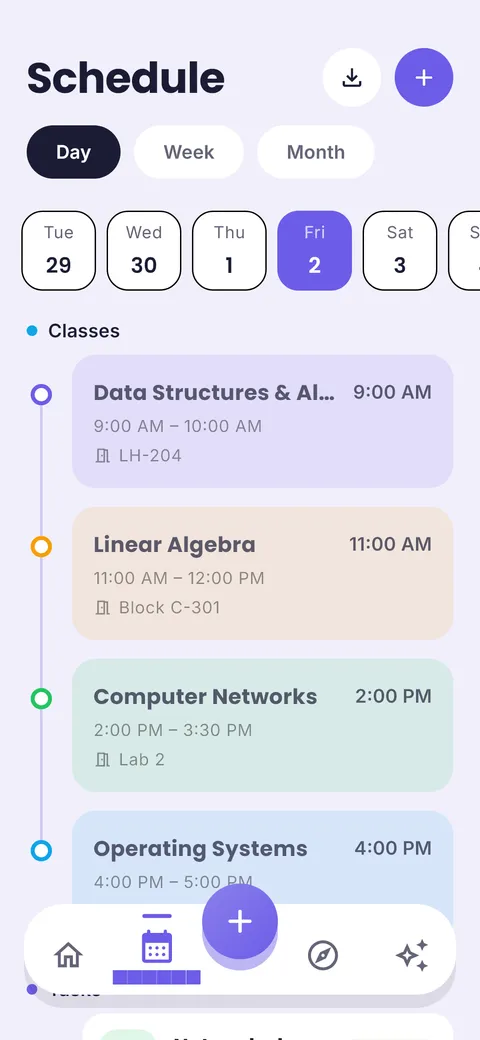
| Step | How ClassTrack does it |
|---|---|
| 1. Timetable | AI timetable import: snap a photo, upload a PDF or paste text, check the classes it found, then save. Day, week and month views, with rooms, teachers, class links and one-off extra or cancelled classes. |
| 2. Exams | A countdown for every exam on the home screen, so the nearest one is always visible. |
| 3. Homework | Assignments, to-dos and events grouped into Overdue, Today and Next 7 days, with reminders before they are due. |
| 4. Study plan | AI learning plans: tell it what to learn and by when; it splits the topic into steps with time estimates and spreads them up to your date. |
| 5. Study blocks | An AI study assistant that knows your real classes and exams, so it can suggest a revision schedule that fits around them. |
| 6. Review | Log marks and see your GPA on a 4.0 or 10-point scale, plus a habit tracker and attendance by subject. |
What is free: the timetable, homework, exam countdowns, grades, habits and reminders, plus 10 AI messages a month, 2 AI timetable scans and 2 AI learning plans. ClassTrack Pro makes the AI unlimited and adds notes and flashcards, daily Google Calendar import, PDF/CSV export and a daily AI agenda. Pro is billed through Google Play in your local currency (see pricing).
Honest limits: ClassTrack is Android-only for now (an iPhone version is coming soon) and has no web app, and the app is in English. If you need iPhone or web access today, read our comparison of study planner apps for alternatives.
Get ClassTrack free on Google Play
5 mistakes that make students quit their planner
- Planning every hour. A plan with no gaps breaks on the first late class. Leave about 20% of each day empty.
- Writing vague tasks. “Study physics” is hard to start. “Physics: 10 questions on circuits” is not.
- Only planning, never testing. Rereading feels productive but is rated low-utility. Put a short self-test at the end of each block (Roediger & Karpicke, 2006).
- Cramming the last week. The same hours spread over several weeks are remembered much better (Cepeda et al., 2008).
- Skipping the weekly review. Without it, the plan drifts away from real life and you stop trusting it.
The goal is not a perfect plan. It is a plan you open every day and fix every week.
Frequently asked questions
What is the best study planner app for students?
The best study planner app is one that holds your class timetable, homework and exam dates together and that you open every day. On Android, ClassTrack does this for free and adds AI timetable import and AI study plans. On iPhone or the web, MyStudyLife is a strong free option. See our comparison of 9 study planner apps. Disclosure: ClassTrack is made by the team behind this site.
Is ClassTrack only for students in one country?
No. ClassTrack is a study planner for students everywhere: high school, college, university and self-learners. Your timetable, homework and exams work the same in any school system, and grades can be shown on a 4.0 GPA scale or a 10-point scale. The app is in English.
Is a study planner app free?
Many are. ClassTrack's timetable, homework, exam countdowns, grades, habits and reminders are free, plus 10 AI messages a month, 2 AI timetable scans and 2 AI learning plans. ClassTrack Pro removes the AI limits. See pricing.
Can an AI study planner make a study plan for me?
Yes. In ClassTrack, you tell the AI what you need to learn and by when. It splits the subject into topics, estimates the time each needs and spreads them across the days before your deadline. You can also try our free study plan generator in your browser, with no sign-up.
Is a study planner app better than a paper planner?
An app is better for repeating classes, reminders and changing plans. Paper has no notifications to distract you. Many students use an app for the timetable and deadlines, and a sticky note or notebook for today’s three tasks.
How many hours a day should I plan to study?
Most students do well with 2–4 focused hours a day outside class, rising on holidays before big exams. Focused hours matter more than total hours. Read how many hours to study a day.
Does ClassTrack work on iPhone?
ClassTrack is on Android now through Google Play. The iPhone version is coming soon; you can join the waitlist on our home page. All the free tools on studyplanner.tech work in any browser, including Safari on iPhone.
Sources
- Britton, B. K. & Tesser, A. (1991). Effects of time-management practices on college grades. Journal of Educational Psychology, 83(3), 405–410. doi.org/10.1037/0022-0663.83.3.405
- Steel, P. (2007). The nature of procrastination: A meta-analytic and theoretical review of quintessential self-regulatory failure. Psychological Bulletin, 133(1), 65–94. doi.org/10.1037/0033-2909.133.1.65
- Gollwitzer, P. M. & Sheeran, P. (2006). Implementation intentions and goal achievement: A meta-analysis of effects and processes. Advances in Experimental Social Psychology, 38, 69–119. doi.org/10.1016/S0065-2601(06)38002-1
- Dunlosky, J. et al. (2013). Improving students’ learning with effective learning techniques. Psychological Science in the Public Interest, 14(1), 4–58. doi.org/10.1177/1529100612453266
- Roediger, H. L. & Karpicke, J. D. (2006). Test-enhanced learning: Taking memory tests improves long-term retention. Psychological Science, 17(3), 249–255. doi.org/10.1111/j.1467-9280.2006.01693.x
- Cepeda, N. J., Vul, E., Rohrer, D., Wixted, J. T. & Pashler, H. (2008). Spacing effects in learning: A temporal ridgeline of optimal retention. Psychological Science, 19(11), 1095–1102. doi.org/10.1111/j.1467-9280.2008.02209.x
Prince Kumar is the founder of ClassTrack and an MBA student at Dr. B.R. Ambedkar University Delhi. He builds study tools from his own experience of juggling classes, deadlines and exams, and checks every guide on this site against peer-reviewed learning research. More about our editorial process.