Study
Study The student planner that keeps everything in one place.
Classes, homework, exams and grades usually live in five places. ClassTrack puts them on one screen and reminds you before anything is due.
Free on Android · iPhone coming soon · Updated 20 October 2026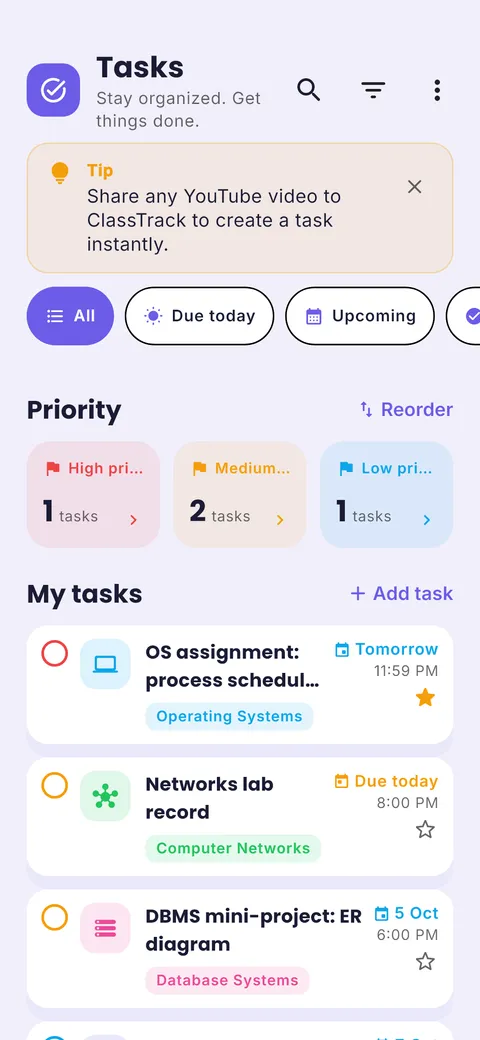

AI timetable import, step by step
From a photo of your timetable to a full week with reminders, in under a minute.
Snap, upload or paste
A photo of the noticeboard, the PDF from your portal, or text.

AI reads every class
Subjects, days, times and rooms, usually in seconds.
- Data Structures Mon, Wed 9:00
- Linear Algebra Mon 11:00, Tue 9:00
- Computer Networks Wed 11:00 + Tue lab
- Operating Systems Tue 11:00, Wed 2:00
Review, then save
Fix anything, tap save. Your week and reminders are ready.
What is a student planner?
A student planner is a calendar and to-do list built around the school or college week. It holds your class timetable, homework and assignment due dates, exam dates and study sessions, so you can see what is happening today and what needs work this week. A digital student planner adds reminders, syncs across devices and can rearrange your plan when dates change.
What you get in the student planner
Class timetable
Day, week and month views with rooms, teachers and class links. Add one-off extra classes in a tap.
Homework & assignments
Assignments, to-dos and events grouped into Overdue, Today and Next 7 days, with priorities.
Exam countdowns
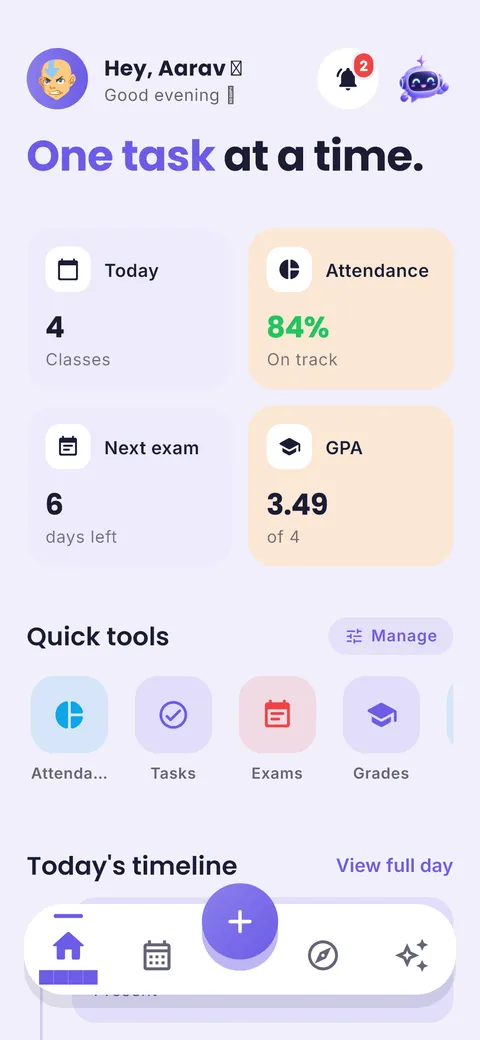
Each exam shows the days left, so revision starts when it should.
Grades & GPA
Log marks, follow your GPA and see the score you need on the next test.
AI study assistant
Ask for a revision plan or a syllabus breakdown. It knows your real classes and exams.
Reminders & widget
Class and task reminders, plus a home-screen widget with today’s classes and tasks.
How to use it in 4 steps
- 1
Add your timetable
Type your classes, or snap a photo of your timetable and let AI build the week.
- 2
Capture every deadline
Add homework, assignments and exams as soon as they are set. A quick-add bar makes it one line.
- 3
Check Today each morning
Home shows today’s classes, tasks due and the next exam at a glance.
- 4
Plan study blocks
Use the planner or the AI assistant to fit study around classes before exam weeks.
Planner habit that sticks
Spend five minutes on Sunday evening looking at next week: exams, due dates and busy days. Then put study blocks on the lighter days. Students who plan weekly, not daily, are less likely to abandon their planner after a busy week.
Tip from Prince Kumar, founder of ClassTrack
Paper planner vs calendar app vs ClassTrack
| Feature | Paper planner | Generic calendar app | ClassTrack |
|---|---|---|---|
| Class timetable | Write it out | Manual events | Built in, or AI from a photo |
| Homework reminders | No | Yes | Yes, grouped by due date |
| Exam countdowns | No | Partly | Yes, per exam |
| Grades & GPA | No | No | Yes |
| Study plan help | No | No | AI study plans and assistant |
Comparison of typical features. Paper planners are still great for people who like writing by hand; many students use both.
Free tools for this
No sign-up. Works in any browser.
Free Online Timetable Maker
Make a colour-coded weekly class timetable, print it, or add it to Google Calendar.
Open tool →Assignment & Homework Planner
Work backwards from a due date and get a dated plan for every step.
Open tool →GPA & SGPA Calculator
Calculate GPA on a 4.0 scale or SGPA/CGPA on a 10-point scale with credits.
Open tool →Frequently asked questions
What is a student planner?
A student planner is a calendar and to-do list built around the school or college week. It holds your class timetable, homework and assignment due dates, exam dates and study sessions, so you can see what is happening today and what needs work this week. A digital student planner adds reminders, syncs across devices and can rearrange your plan when dates change.
What is the best student planner app?
Look for a planner that holds your timetable, homework and exams together and reminds you on your phone. ClassTrack does all three, adds grades and an AI assistant, and is free on Android.
Is ClassTrack a good planner for college students?
Yes. It handles lectures, labs and tutorials with rooms and links, semester exams, assignments, GPA and a semester wrap-up when the term ends (Pro).
Can I use it for school homework?
Yes. Homework and assignments have due dates, priorities and reminders, and the Home screen shows how many tasks are due today and this week.
Does the student planner work offline?
You can open the app and see your plan without a connection. Changes sync to your account when you are back online. AI features need the internet.
Is my data private?
Your planner is private to your account. You can delete your account and data at any time in Settings. See the privacy policy.
Still have a question?
Read the full FAQ or contact the team. A real person replies, usually within two working days.
Related guides
Other planners
- Schedule planner: Plan your week, day by day
- Timetable app: Build or import your class timetable
- AI study planner: A study plan built around your deadline
- Exam planner: Countdowns and revision plans
- Homework planner: Assignments with due dates and reminders
Take your plan with you.
Free on Android. ClassTrack keeps your timetable, homework, exams and study plan in one place, with reminders.