Study
Study A homework planner that tells you what to do next.
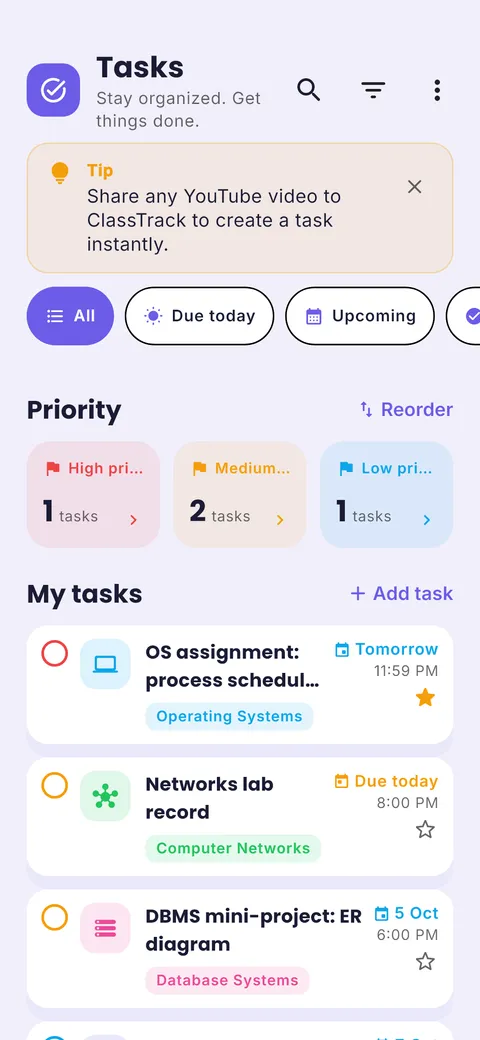
Add homework the moment it is set. ClassTrack groups everything by Overdue, Today and Next 7 days and reminds you before it is due.
Free on Android · iPhone coming soon · Updated 20 October 2026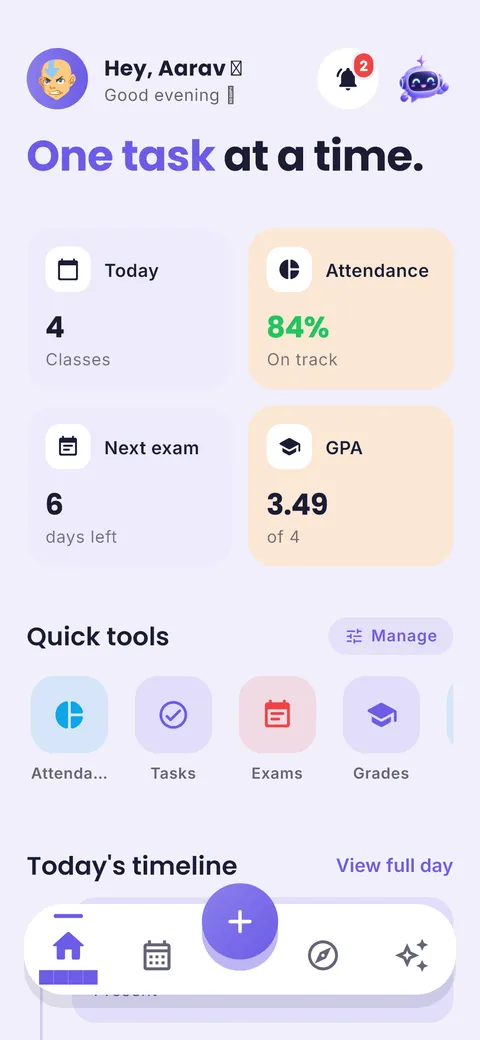

Ask your planner, get answers
“Am I free today?” “What is due this week?” “When is my next exam?” The ClassTrack assistant answers from your own timetable, tasks and exams.
Interactive demo with a sample student’s week.
What is a homework planner?
A homework planner is a list of assignments and their due dates, sorted so you always know what to work on next. A digital homework planner adds reminders, lets you link each task to a subject, and shows how much is due this week so you can plan time before the deadline instead of the night before.
What you get in the homework planner
Assignments tab
All assignments in one tab, filtered by subject.
Grouped by date
Overdue, Today and Next 7 days counts. Tap to filter.
Quick-add bar
Type the homework and press enter. Details later.
Priorities
Mark what matters most and sort by priority.
Due-date reminders
Reminders before a task is due, cancelled automatically once you tick it off.
Tasks due on Home
Home shows how many tasks are pending, overdue and due today.
How to use it in 4 steps
- 1
Capture
Add every assignment the moment it is set, with the due date.
- 2
Size it
Big projects get split into steps with their own dates.
- 3
Schedule
Put the first step on a free block this week, not the night before.
- 4
Close it
Tick it off. Reminders stop and the count updates.
The two-day buffer
Set your own deadline two days before the real one. If something goes wrong (a sick day, a surprise test), you still submit on time. Our assignment planner builds this buffer in for you.
Tip from Prince Kumar, founder of ClassTrack
Paper planner vs calendar app vs ClassTrack
| Feature | Paper planner | Generic calendar app | ClassTrack |
|---|---|---|---|
| Due dates & reminders | Dates only | Yes | Yes |
| Grouped Today / Next 7 days | No | Partly | Yes |
| Linked to subjects | Manual | Tags | Yes, with subject colour |
| Next to timetable & exams | Same book | No | Yes |
| Split big projects | Manual | Subtasks | Use the assignment planner |
Comparison of typical features. Paper planners are still great for people who like writing by hand; many students use both.
Free tools for this
No sign-up. Works in any browser.
Free Online Timetable Maker
Make a colour-coded weekly class timetable, print it, or add it to Google Calendar.
Open tool →Pomodoro Study Timer
A distraction-free 25/5 focus timer with long breaks and a session counter.
Open tool →Assignment & Homework Planner
Work backwards from a due date and get a dated plan for every step.
Open tool →Frequently asked questions
What is a homework planner?
A homework planner is a list of assignments and their due dates, sorted so you always know what to work on next. A digital homework planner adds reminders, lets you link each task to a subject, and shows how much is due this week so you can plan time before the deadline instead of the night before.
What is the best way to keep track of homework?
Write it down the moment it is set, with a due date, in one place you check every day. A homework planner app adds reminders and shows what is due today and this week.
Can I plan a big assignment step by step?
Yes. Use our free assignment planner to split a project into dated steps, then add them as tasks in ClassTrack.
Is the homework planner free?
Yes. Tasks, assignments, priorities and reminders are all free in ClassTrack.
Does it work for school and college?
Yes. Students use it for school homework, college assignments, lab reports and group projects.
Still have a question?
Read the full FAQ or contact the team. A real person replies, usually within two working days.
Related guides
Other planners
- Student planner: Classes, homework and exams in one app
- Schedule planner: Plan your week, day by day
- Timetable app: Build or import your class timetable
- AI study planner: A study plan built around your deadline
- Exam planner: Countdowns and revision plans
Take your plan with you.
Free on Android. ClassTrack keeps your timetable, homework, exams and study plan in one place, with reminders.