Study
Study A weekly schedule planner you can keep all week.
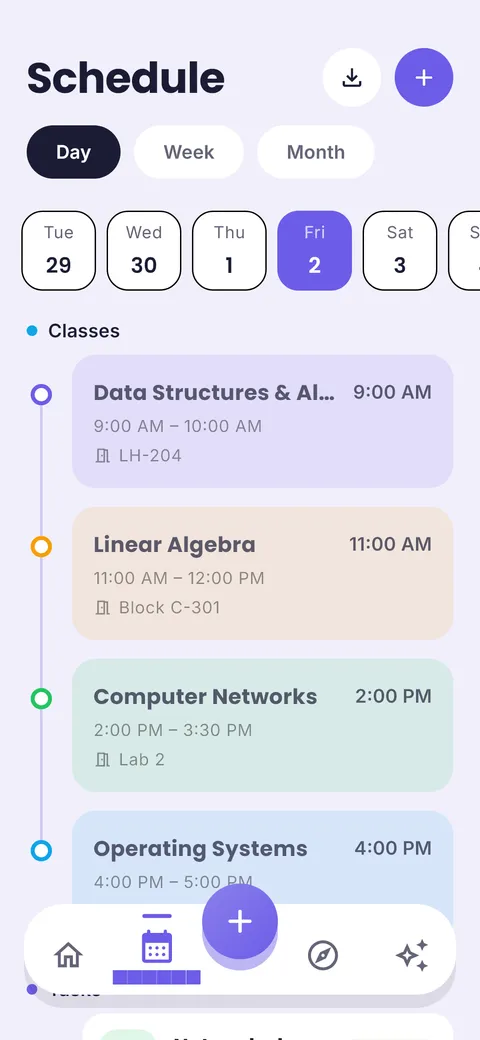
Fixed classes go in first. Then study blocks, homework, work shifts and rest. ClassTrack shows the whole week and nudges you when something starts.
Free on Android · iPhone coming soon · Updated 20 October 2026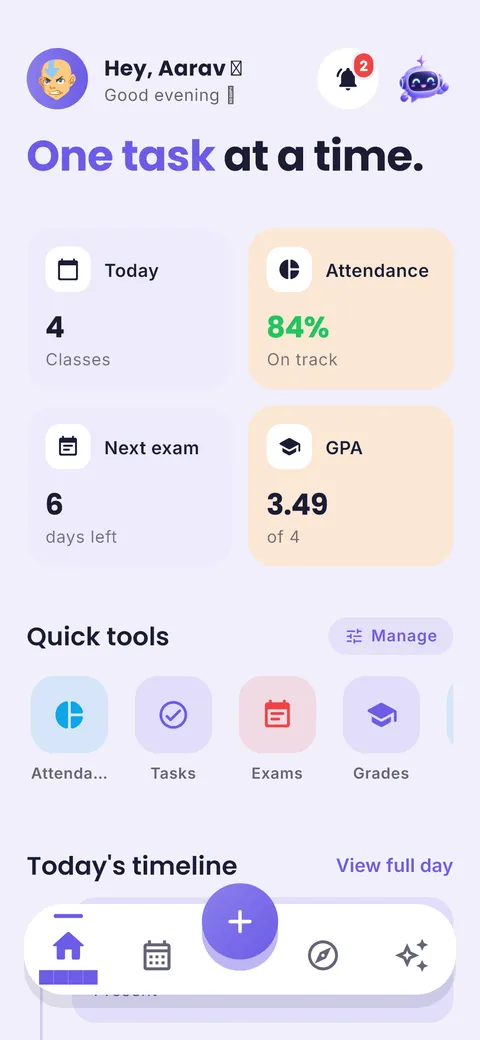

Ask your planner, get answers
“Am I free today?” “What is due this week?” “When is my next exam?” The ClassTrack assistant answers from your own timetable, tasks and exams.
Interactive demo with a sample student’s week.
What is a schedule planner?
A schedule planner is a calendar view of your week, hour by hour, that shows fixed commitments (classes, work, travel) and the flexible time around them. For students, a good schedule planner makes free time visible so you can turn it into study blocks, and keeps a realistic amount of rest so the plan survives a busy week.
What you get in the schedule planner
Day, week & month views
Switch views in one tap. Today is always one tap away on the Home screen.
Recurring classes
Set a class once and it repeats every week of the term, with room and teacher.
One-off events
Add an extra class, a cancelled lecture or an event without changing the weekly pattern.
Google Calendar sync
Two-way sync pulls in your calendar and pushes classes and exams back (Pro).
Start-of-class nudges
Reminders before a class starts, plus quiet hours so nights stay quiet (Pro).
Your study rhythm
Tell the app if you are an early bird, daytime or night-owl student when you set it up.
How to use it in 4 steps
- 1
Lock in fixed time
Classes, labs, work shifts, travel and sleep. These do not move.
- 2
Find your free blocks
Look for gaps of 45 minutes or more. Those are your study blocks.
- 3
Assign subjects
Give harder or exam-soon subjects the longer, earlier blocks.
- 4
Protect one rest block a day
A plan with no rest gets abandoned. Keep at least one evening off each week.
The 80% rule
Plan only about 80% of your free time. The rest absorbs the things that always come up: a longer assignment, a late bus, a tired evening. A schedule with slack is one you can keep.
Tip from Prince Kumar, founder of ClassTrack
Paper planner vs calendar app vs ClassTrack
| Feature | Paper planner | Generic calendar app | ClassTrack |
|---|---|---|---|
| Weekly view | Yes | Yes | Yes, plus day and month |
| Recurring classes by term | Rewrite weekly | Manual repeat | Yes, term-aware |
| Import timetable from photo | No | No | Yes (AI) |
| Homework next to schedule | Separate | Separate app | Same screen |
| Reminders | No | Yes | Yes |
Comparison of typical features. Paper planners are still great for people who like writing by hand; many students use both.
Free tools for this
No sign-up. Works in any browser.
Free Study Plan Generator
Turn subjects and an exam date into a day-by-day study timetable with built-in revision.
Open tool →Free Online Timetable Maker
Make a colour-coded weekly class timetable, print it, or add it to Google Calendar.
Open tool →Pomodoro Study Timer
A distraction-free 25/5 focus timer with long breaks and a session counter.
Open tool →Frequently asked questions
What is a schedule planner?
A schedule planner is a calendar view of your week, hour by hour, that shows fixed commitments (classes, work, travel) and the flexible time around them. For students, a good schedule planner makes free time visible so you can turn it into study blocks, and keeps a realistic amount of rest so the plan survives a busy week.
How do I make a weekly schedule as a student?
Put fixed commitments in first, then mark free gaps of 45+ minutes as study blocks, assign subjects by difficulty and deadline, and keep one rest block a day. See our sample weekly schedules.
Is there a free schedule planner?
Yes. ClassTrack’s schedule and reminders are free on Android. For a printable week, use the free timetable maker in your browser.
Can I sync my schedule with Google Calendar?
Yes, with ClassTrack Pro. It auto-imports your calendar every day and pushes your classes, exams and deadlines back into Google Calendar.
How many hours should a student study per day?
It depends on your course and exams. Many students do well with 2–4 focused hours outside class on weekdays, more in exam season. Consistency across the week matters more than one long day.
Still have a question?
Read the full FAQ or contact the team. A real person replies, usually within two working days.
Related guides
Other planners
- Student planner: Classes, homework and exams in one app
- Timetable app: Build or import your class timetable
- AI study planner: A study plan built around your deadline
- Exam planner: Countdowns and revision plans
- Homework planner: Assignments with due dates and reminders
Take your plan with you.
Free on Android. ClassTrack keeps your timetable, homework, exams and study plan in one place, with reminders.