Study
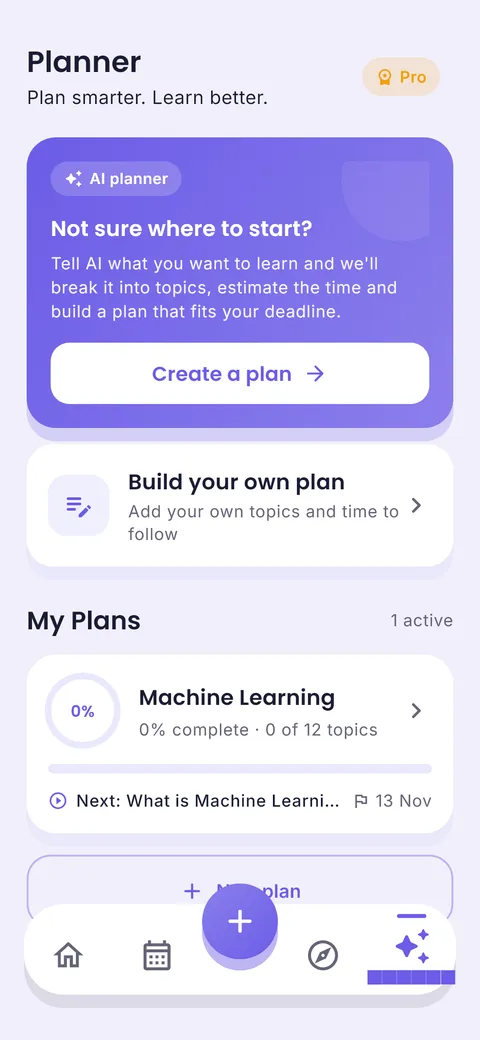
Study An AI study planner that plans backwards from your deadline.
Type what you want to learn and your deadline. The AI splits it into topics, estimates how long each takes and spreads the work across the days you have.
Free on Android · iPhone coming soon · Updated 20 October 2026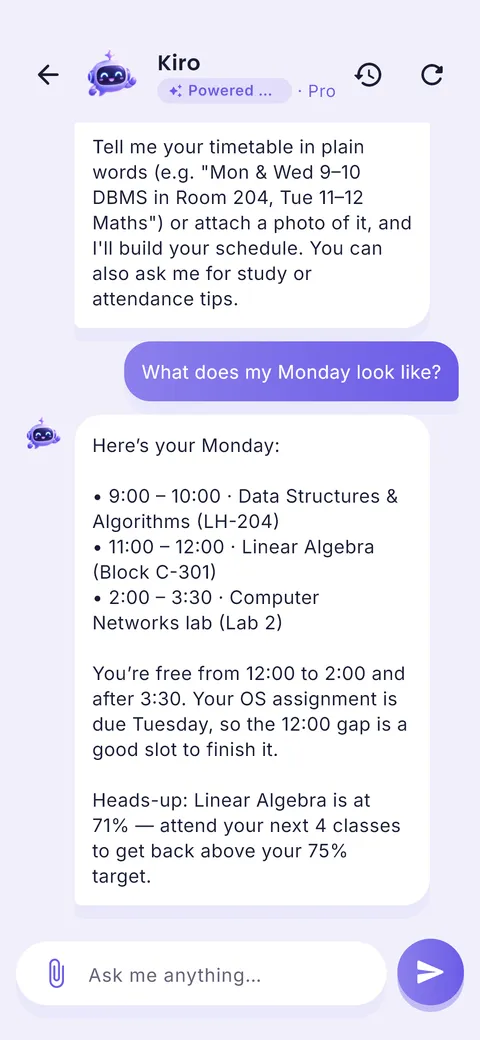

Ask your planner, get answers
“Am I free today?” “What is due this week?” “When is my next exam?” The ClassTrack assistant answers from your own timetable, tasks and exams.
Interactive demo with a sample student’s week.
What is an AI study planner?
An AI study planner uses a language model to turn a learning goal (an exam syllabus, a course or a skill) into a structured plan: a list of topics in a sensible order, a time estimate for each, and a schedule that ends before your deadline. You still decide what to study; the AI does the splitting and scheduling that most students skip.
What you get in the AI study planner
AI learning plans
A step-by-step roadmap for a subject or skill. Two free plans; unlimited with Pro.
Topics & subtopics
Big topics are split into small steps you can finish in one sitting.
Time estimates
Each topic gets an estimate, so you know if the deadline is realistic.
Progress tracking
See percent complete and what is next on every plan.
AI study assistant
Ask for a revision schedule or exam prep plan. 10 free messages a month.
Build your own plan
Prefer control? Add your own topics and times and follow them.
How to use it in 4 steps
- 1
Describe the goal
For example: “Linear Algebra mid-term on 13 Nov” or “Learn SQL basics in 3 weeks”.
- 2
Review the topics
Add, remove or reorder topics. You know your syllabus best.
- 3
Follow the next step
The plan always shows the next topic and the target date.
- 4
Ask when stuck
Use the assistant for an explanation, practice questions or a new plan.
Make the AI plan smarter
Give the AI three things: the exact topics from your syllabus, your deadline, and how many hours a day you can really study. Then add your own “self-test” step after each topic. Practice testing is one of the two best-supported study techniques.
Tip from Prince Kumar, founder of ClassTrack
Paper planner vs calendar app vs ClassTrack
| Feature | Paper planner | Generic calendar app | ClassTrack |
|---|---|---|---|
| Splits syllabus into topics | Manual | Manual | AI, editable |
| Time estimates | Guess | Guess | Per topic |
| Fits your deadline | Manual maths | Manual | Yes |
| Knows your classes | No | No | Yes |
| Progress | Tick boxes | Tick boxes | Percent and next step |
Comparison of typical features. Paper planners are still great for people who like writing by hand; many students use both.
Free tools for this
No sign-up. Works in any browser.
Free Study Plan Generator
Turn subjects and an exam date into a day-by-day study timetable with built-in revision.
Open tool →Exam Countdown Timer
See days and study days left for every exam, plus the hours you need per day.
Open tool →Pomodoro Study Timer
A distraction-free 25/5 focus timer with long breaks and a session counter.
Open tool →Frequently asked questions
What is an AI study planner?
An AI study planner uses a language model to turn a learning goal (an exam syllabus, a course or a skill) into a structured plan: a list of topics in a sensible order, a time estimate for each, and a schedule that ends before your deadline. You still decide what to study; the AI does the splitting and scheduling that most students skip.
Can AI make a study plan for me?
Yes. In ClassTrack you describe what you want to learn and your deadline, and the AI builds a plan with topics, time estimates and dates. You can edit everything.
Is the AI study planner free?
The free plan includes 2 AI learning plans and 10 AI assistant messages a month. Pro removes both limits.
Which AI does ClassTrack use?
ClassTrack uses Google Gemini models, called from our own server so your requests are not sent from the app with a public key.
Is there a free study plan generator without AI?
Yes. Our study plan generator builds a dated plan from your subjects and exam date using simple rules, entirely in your browser.
Still have a question?
Read the full FAQ or contact the team. A real person replies, usually within two working days.
Related guides
Other planners
- Student planner: Classes, homework and exams in one app
- Schedule planner: Plan your week, day by day
- Timetable app: Build or import your class timetable
- Exam planner: Countdowns and revision plans
- Homework planner: Assignments with due dates and reminders
Take your plan with you.
Free on Android. ClassTrack keeps your timetable, homework, exams and study plan in one place, with reminders.